Use cases
How to Evaluate PPE Compliance with Computer Vision
PPE detection is one of the most requested computer vision applications. This article explains how it works, what affects reliability in real sites, how to evaluate a solution on your own footage, and where human review remains essential.
EdgeTech editorial team ·
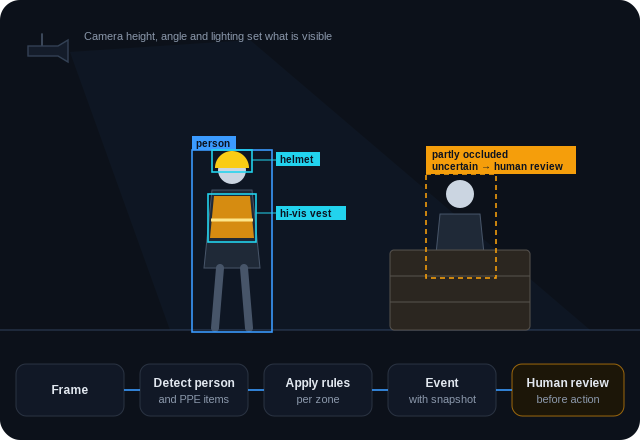
How PPE detection works
Most PPE solutions combine three steps. An object detection model finds people and PPE items in each frame — or finds people and then recognizes PPE attributes on each person. Object tracking follows each person across frames so a single situation creates a single event. Zone rules decide which PPE is required where. Research and vendor material commonly describe YOLO-family detectors for this task, though the choice of model matters less than the quality of the data and camera setup.
What affects reliability on real sites
- Camera placement. People should appear large enough and be seen from the front or side.
- Occlusion. Machinery, materials and other workers hide body parts; published work on construction sites highlights occlusion, overlapping workers and variable lighting as key challenges.
- Lighting. Glare, backlight, shadows and night conditions change appearance.
- PPE variation. Colors and styles differ between sites and suppliers.
- Matching PPE to people. In crowded scenes, assigning a helmet to the right person is non-trivial.
How to evaluate a PPE solution
- Define the rules. Which PPE items, in which zones, at which times?
- Collect representative footage from the cameras you would actually use, including busy periods and difficult lighting.
- Agree success criteria. For example, the acceptable balance between missed violations and false alerts, per PPE item.
- Test on your footage. Compare results against manually reviewed ground truth.
- Review failure cases. Understand why misses and false alerts happen, and whether camera changes would help.
Where human review fits
PPE detection supports safety teams; it does not replace them. Uncertain cases — partially hidden workers, unusual equipment — should be routed for review rather than treated as violations.
Edge or Cloud?
PPE monitoring usually suits Edge-only processing: alerts stay local and workplace footage stays on site. Aggregated statistics can be shared centrally for multi-site organizations.
Next step
The fastest way to know whether PPE detection will work at your site is to test it on a short, representative clip from your own cameras.