AI TaskProcessing mode across frames
Object Tracking and Multi-Object Tracking
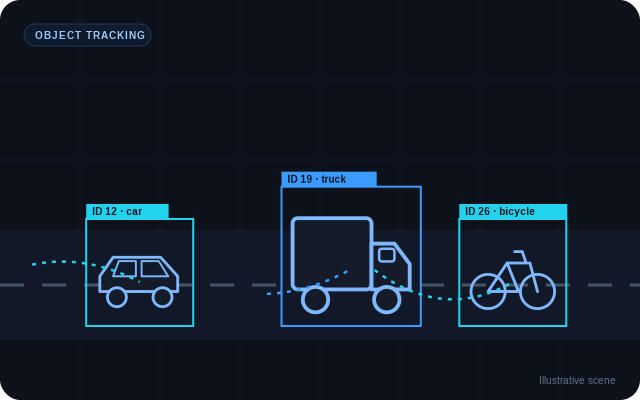
Object tracking links detections of the same object across consecutive video frames and assigns each one a persistent ID. It turns per-frame detections into movement, counts, dwell times and events — and is a processing mode built on detection rather than a separate business application.
Definition
Object tracking associates detections of the same object over time and assigns a track ID. Single-object tracking follows one target; multi-object tracking (MOT) follows many objects of one or more classes simultaneously, handling objects entering, leaving and temporarily disappearing.
Typical outputs
- A track ID per object, persistent across frames
- Trajectories (positions over time) for each track
- Derived measures such as direction, dwell time and line crossings
Where it is used
Counting and flows
Counting people or vehicles crossing lines without double-counting, and measuring direction.
Dwell and zone events
Measuring how long objects stay in zones and generating one event per situation instead of one per frame.
Movement analysis
Following vehicles through junctions, assets through handover points, or people through spaces.
How it works
A detector finds objects in each frame. The tracker predicts where each existing track should be next, then matches new detections to existing tracks using position, motion and sometimes appearance. Unmatched detections start new tracks; tracks without matches for a while are closed.
From tracks to business events
Tracks are the raw material for many use cases: line crossings become counts, time in a zone becomes dwell time, and a single safety situation becomes one event rather than hundreds of per-frame detections. This is why tracking appears across many use cases without being a use case itself.
Multi-object tracking at the edge
MOT adds modest compute to detection, but it requires a sufficient frame rate. Edge designs balance the number of streams, frame rate and model size to keep tracking stable.
Running it at the edge
Model, resolution, frame rate and hardware are planned together for each project.
Design considerations
- Frame rate matters. Tracking needs frames close enough in time to associate objects reliably; very low frame rates cause ID switches.
- Lightweight association. Many trackers combine motion prediction with appearance cues; appearance models add accuracy but also compute.
- Within one camera. Tracking within a camera view is standard; following objects across cameras (re-identification) is a separate, harder problem.
Limitations & scope
- Occlusion, crowding and objects crossing paths can cause ID switches or lost tracks.
- Tracking quality depends directly on detection quality.
- Cross-camera identity is not implied; it requires additional methods and raises privacy questions for people.
Proof of Concept
Have a visual AI challenge? Let's prove it.
Share a video of what happens in your environment and describe the outcome you need. We review every request for technical feasibility, then agree the scope of a focused Proof of Concept (PoC) with you.
Every request is reviewed for technical feasibility. PoC scope, timing and terms are agreed individually.
Frequently asked questions
Is object tracking a separate AI model?
Usually it is an algorithm that runs on top of a detector's output, sometimes with a small appearance model. It is best understood as a processing mode built on detection.
Does tracking identify who a person is?
No. A track ID is a temporary number within the camera view. It does not determine identity.
Related topics
How this page connects to industries, use cases, AI tasks, input sources and deployment options.
Industries
- Edge AI Video Intelligence for Airports
- Edge AI Video Intelligence for Animal Monitoring
- Edge AI Video Intelligence for Construction
- Edge AI Video Intelligence for Healthcare Facilities
- Edge AI Video Intelligence for Infrastructure
- Edge AI Video Intelligence for Logistics
- Edge AI Video Intelligence for Media and Broadcasting
- Edge AI Video Intelligence for Ports and Maritime
- Edge AI Video Intelligence for Retail
- Edge AI Video Intelligence for Smart Cities
- Edge AI Video Intelligence for Sports Analytics
- Edge AI Video Intelligence for Warehousing
Use Cases
- Airfield Wildlife Hazard Detection
- Animal Behavior Monitoring
- Asset Tracking and Monitoring
- Automated Sports Video Production
- Baggage Handling Monitoring
- Ball Tracking
- Crane Lift Zone Monitoring
- Fish Counting and Aquaculture Observation
- Forklift and Pedestrian Proximity Awareness
- Illegal Parking Detection
- Lameness Indicators in Livestock
- Livestock Counting
- Loading and Unloading Monitoring
- Loitering and Dwell Detection
- Parcel Detection and Counting
- Pedestrian Crossing Safety Analytics
- People Counting
- Perimeter Monitoring and Intrusion Detection
- Platform Edge Safety Awareness
- Player Tracking
- Production Line and Process Monitoring
- Queue Monitoring
- Restricted Area Monitoring
- Robot Workspace Monitoring
- Store Traffic Heat Maps
- Tailgating Detection at Access Points
- Traffic Monitoring
- Unattended Object Detection
- Vehicle Counting and Classification
- Vehicle Speed Estimation for Traffic Studies
- Vessel Detection and Tracking
- Video Anonymization and Privacy Redaction
- Workplace Safety Monitoring
- Wrong-Way Driving Detection
- Yard and Trailer Tracking