AI TaskCore computer vision task
Object Detection
Object detection finds and labels the objects in an image or video frame and marks each one with a bounding box. It is the starting point for many video analytics use cases, from PPE compliance to aerial inspection.
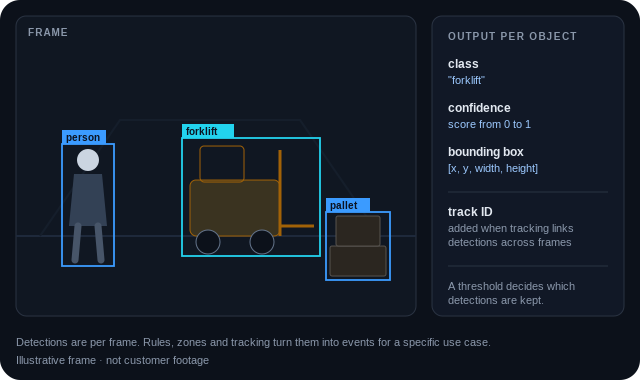
Definition
Object detection predicts, for each object of interest in an image, a class label, a confidence score and a bounding box that locates it. Applied frame by frame, it turns video into structured data that rules, zones and tracking can act on.
Typical outputs
- A class label for each detected object, such as person, helmet or vehicle
- A confidence score that indicates how certain the model is
- Bounding box coordinates that locate the object in the frame
- Track IDs across frames when object tracking is enabled — a processing mode built on detection, not a separate task
Where it is used
Safety and compliance
Detecting people, PPE items and vehicles as the basis for rules such as PPE compliance or restricted-zone monitoring.
Inspection
Locating components, defects or assets — including from drones, where oriented boxes help with rotated objects seen from above.
Operational monitoring
Detecting and, with tracking, counting objects to understand flow, queues, occupancy or equipment activity.
How it works
A detection model processes an image and returns a list of objects, each with a class, a confidence score and a box. In video analytics this runs on a sequence of frames, often on an Edge AI computer close to the camera. On their own, detections are just data. They become useful when combined with rules — “a person in this zone without a helmet” — and with tracking, which follows each object over time.
Choosing the right task
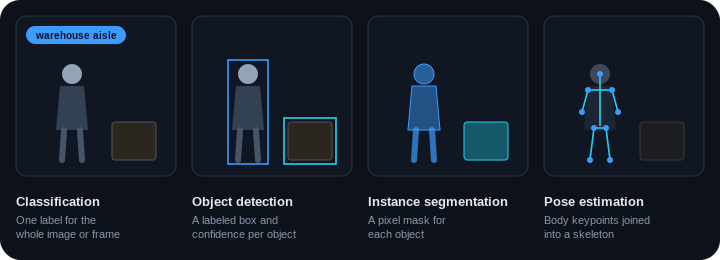
Object detection is often the right first choice, but not always. If only the overall content of an image matters, classification is simpler. If exact shapes or areas matter — a spill, a surface defect, a material boundary — segmentation is more suitable. For rotated objects seen from above, such as vehicles in aerial footage, oriented bounding boxes fit more tightly than standard boxes. Body posture calls for pose estimation. Reading text — labels, codes or gauge values — calls for optical character recognition (OCR), which usually combines a step that finds text regions with a model that reads them.
Object tracking is different from all of these: it is not a separate kind of model output but a processing mode that links detections across frames, giving each object an ID over time.
Detection at the edge
Running detection at the edge keeps results close to where they are needed and avoids sending continuous video elsewhere. The trade-off is fixed compute capacity, so model choice, resolution and frame rate are planned together with the hardware rather than in isolation.
Running it at the edge
Model, resolution, frame rate and hardware are planned together for each project.
Design considerations
- Model size and hardware. Smaller models run faster on embedded hardware; larger ones can be more accurate. The balance is chosen for the use case and the available compute.
- Input resolution. Small or distant objects need enough pixels. Higher resolution helps detection but increases compute per frame.
- Frame rate and stream count. The total workload is frames per second multiplied by the number of streams. Many use cases do not need every frame analyzed.
- Confidence thresholds. Thresholds trade missed detections against false ones. They are tuned on footage from the real site, not set once and forgotten.
Limitations & scope
- Small, distant, unusual or heavily occluded objects are missed more often.
- Models perform best on images similar to their training data. New sites, viewpoints or object types usually need evaluation and often additional training data.
- Detection reports what and where, not intent or context. Rules, tracking and human review provide that.
Proof of Concept
Have a visual AI challenge? Let's prove it.
Share a video of what happens in your environment and describe the outcome you need. We review every request for technical feasibility, then agree the scope of a focused Proof of Concept (PoC) with you.
Every request is reviewed for technical feasibility. PoC scope, timing and terms are agreed individually.
Frequently asked questions
How is object detection different from classification and segmentation?
Classification gives one label for a whole image. Detection locates each object with a box. Segmentation goes further and marks the exact pixels belonging to each object or region.
What is object tracking?
Tracking links detections of the same object across consecutive frames and gives it an ID. It is a processing mode built on detection, used for counting, measuring dwell time or avoiding repeated alerts.
Can object detection run on Edge hardware?
Yes. Many detection models are designed for embedded GPUs and AI accelerators. Achievable frame rates depend on the model, resolution, number of streams and hardware, so they are measured for each project.
Related topics
How this page connects to industries, use cases, AI tasks, input sources and deployment options.
Industries
- Edge AI Video Intelligence for Aerospace
- Edge AI Video Intelligence for Agriculture
- Edge AI Video Intelligence for Airports
- Edge AI Video Intelligence for Animal Monitoring
- Edge AI Video Intelligence for Automotive
- Edge AI Video Intelligence for Automotive Services
- Edge AI Video Intelligence for Banking and Finance
- Edge AI Video Intelligence for Construction
- Edge AI Video Intelligence for E-commerce Fulfillment
- Edge AI Video Intelligence for Education Campuses
- Edge AI Video Intelligence for Healthcare Facilities
- Edge AI Video Intelligence for Hospitality and Food Service
- Edge AI Video Intelligence for Manufacturing
- Edge AI Video Intelligence for Media and Broadcasting
- Edge AI Video Intelligence for Mining
- Edge AI Video Intelligence for Oil and Gas
- Edge AI Video Intelligence for Ports and Maritime
- Edge AI Video Intelligence for Recycling and Waste Management
- Edge AI Video Intelligence for Retail
- Edge AI Video Intelligence for Robotics and Automation
- Edge AI Video Intelligence for Smart Cities
- Edge AI Video Intelligence for Sports Analytics
- Edge AI Video Intelligence for Telecommunications
- Edge AI Video Intelligence for Transportation and Rail
- Edge AI Video Intelligence for Utilities
- Edge AI Video Intelligence for Warehousing
Use Cases
- Aircraft Turnaround Monitoring
- Airfield Wildlife Hazard Detection
- AMR Obstacle Perception
- Assembly Step Verification
- Asset Tracking and Monitoring
- ATM Tamper Awareness
- Automated Sports Video Production
- Axle and Wagon Counting
- Ball Tracking
- Blister Pack Inspection
- Brand and Logo Exposure Measurement
- Cleanroom Gowning Compliance
- Construction Progress Monitoring
- Container ID Recognition
- Crane Lift Zone Monitoring
- Cyclist and Micromobility Counting
- Depalletizing Guidance
- Dock Door Monitoring
- Drone-Based Inventory Scanning
- Fastener and Rivet Inspection
- Fire and Smoke Detection
- Foreign Material Detection in Food
- Foreign Object Debris (FOD) Detection
- Forklift and Pedestrian Proximity Awareness
- Fruit Counting and Yield Estimation
- Heavy Equipment Utilization Tracking
- Heavy Vehicle Proximity Awareness
- Hygiene Compliance Monitoring
- Illegal Parking Detection
- Insect and Pest Trap Monitoring
- Inventory Monitoring
- License Plate Recognition
- Litter and Illegal Dumping Detection
- Loading and Unloading Monitoring
- Manual Workstation Cycle Time Analysis
- Missing Component Detection
- Object Pose Estimation for Robotics
- Occupancy Monitoring
- Order Packing Verification
- Pallet Counting and Identification
- Parking Monitoring
- Part and Component Counting
- PCB Inspection
- Pedestrian Crossing Safety Analytics
- People Counting
- Perimeter Monitoring and Intrusion Detection
- Pick-and-Place Guidance
- Pill Counting
- Pipeline Right-of-Way Monitoring
- Planogram Compliance
- Plant Stand and Emergence Counting
- Platform Edge Safety Awareness
- Player Tracking
- Portion and Plating Verification
- Pothole and Road Damage Detection
- Power Line Inspection
- PPE Compliance Monitoring
- Product Detection and Verification
- Production Line and Process Monitoring
- Queue Monitoring
- Railway Track Inspection
- Rebar and Pipe Counting
- Recycling Contamination Detection
- Restricted Area Monitoring
- Ripeness and Harvest Readiness
- Robot Workspace Monitoring
- Self-Checkout Scan Awareness
- Service Bay Monitoring
- Shelf Availability Monitoring
- Shipping Label Reading
- Slab and Coil ID Reading
- Smart Vending and Cooler Product Recognition
- Streetlight Outage Detection
- Substation Monitoring
- Surgical Instrument Tray Verification
- Telecom Tower Inspection
- Tool Presence Verification
- Traffic Monitoring
- Traffic Sign and Road Asset Inventory
- Transit Occupancy Monitoring
- Vehicle Counting and Classification
- Vehicle Damage Inspection
- Vessel Detection and Tracking
- Visual Compliance Monitoring
- Weed Detection for Targeted Treatment
- Wildfire Smoke Detection
- Wildlife Monitoring
- Wire Harness and Connector Inspection
- Working at Height Safety Awareness
- Workplace Safety Monitoring
- Wrong-Way Driving Detection