Use cases
Real-Time Visual Inspection at the Edge
Inline visual inspection must keep pace with production. This article explains what makes real-time inspection work at the edge — imaging, model choice, timing and integration — and how to scope a first inspection project.
EdgeTech editorial team ·
Why inspection belongs at the edge
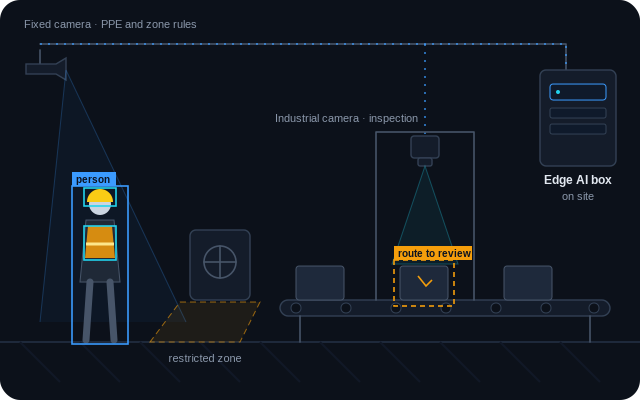
An inspection decision is only useful if it arrives before the part leaves the station. That makes inline inspection one of the clearest cases for Edge processing: images are analyzed next to the line, and results trigger a reject, a diversion or an operator alert within the cycle time.
Imaging comes first
Most inspection projects succeed or fail on imaging. A defect that is not visible under the chosen lighting and resolution cannot be detected by any model. Key choices include:
- Lighting — diffuse, directional, backlight or structured, depending on the defect.
- Optics and distance — enough pixels across the smallest relevant defect.
- Triggering — capturing each part in the same position.
Choosing the AI approach
- Classification for pass or fail when location does not matter.
- Detection or segmentation when the defect’s location and size matter.
- Anomaly detection when defects are rare or varied.
Many lines combine approaches: supervised detection for known defects and anomaly detection as a safety net.
Fitting the cycle time
Model size, image resolution and hardware are sized together. Cropping to the region of interest and batching parts where possible keep processing within the line’s timing.
Integration and decisions
Results must reach the line: a signal to a reject mechanism, a PLC or an operator screen. Borderline results are routed to inspectors, and images are stored for traceability and continuous improvement.
Scoping a first project
Pick one station, one product family and the most costly defect. Collect representative good and defective samples, agree acceptance criteria with quality staff, and evaluate on footage the model has not seen.