AI TaskCore computer vision task
Image and Object Classification
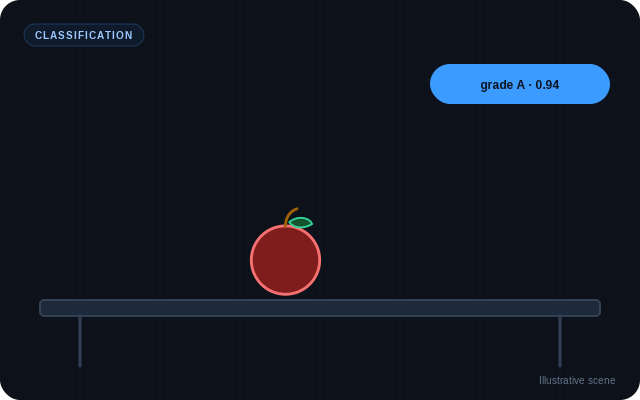
Classification assigns a label to a whole image or to an individual object crop — good or defective, running or stopped, product variant A or B. It is the simplest output and often the most efficient choice when location is not needed.
Definition
Image classification predicts one or more class labels, with confidence scores, for an entire image or frame. Object classification applies the same idea to a cropped region — typically an object found by a detector — to assign a finer category or state.
Typical outputs
- One or more class labels per image or crop
- A confidence score for each label
- Optionally, top-N alternative classes for review
Where it is used
Pass or fail decisions
Classifying inspection images as acceptable or defective when the defect's location is not required.
Equipment state
Recognizing whether a machine, light or display is in a particular state.
Variant identification
Assigning a product variant or attribute to an object found by a detector.
How it works
A classification model takes an image, or a crop of one, and outputs a probability for each class it knows. The highest-scoring class, above a threshold, is taken as the answer. Multi-label variants can assign several labels at once.
Classification within larger pipelines
In video analytics, classification is often combined with other tasks. A detector locates vehicles, and a classifier assigns their type. A fixed camera views a gauge region, and a classifier recognizes its state. Keeping each model focused makes pipelines easier to maintain and run on Edge hardware.
Choosing classification
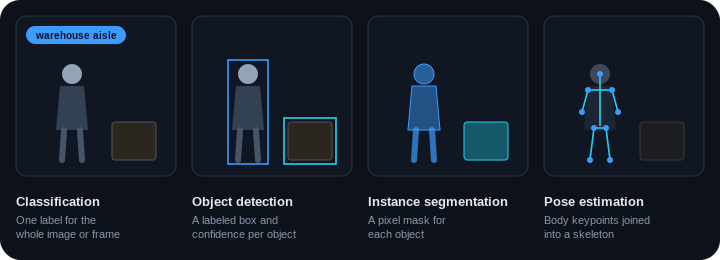
Classification is a good first choice when the decision is about the whole view or a fixed region. When several objects or locations matter, detection or segmentation is usually more appropriate.
Running it at the edge
Model, resolution, frame rate and hardware are planned together for each project.
Design considerations
- Lightweight models. Classification models are typically smaller and faster than detection or segmentation models, which suits low-power Edge hardware.
- Region of interest. Cropping the relevant area of the frame before classification improves accuracy and reduces compute.
- Two-stage pipelines. A detector finds objects; a classifier then assigns a detailed class or state to each one.
Limitations & scope
- Classification does not tell you where something is; use detection or segmentation when location matters.
- A single label per image struggles when several relevant objects appear together.
- Performance depends on how representative the training images are of real conditions.
Proof of Concept
Have a visual AI challenge? Let's prove it.
Share a video of what happens in your environment and describe the outcome you need. We review every request for technical feasibility, then agree the scope of a focused Proof of Concept (PoC) with you.
Every request is reviewed for technical feasibility. PoC scope, timing and terms are agreed individually.
Frequently asked questions
When should I use classification instead of detection?
When the question is about the whole image or a fixed region — for example, “is this part good?” — and you do not need to know where in the image something is.
What is object classification?
Classification applied to a crop of an image, usually an object located by a detector, to determine a finer category such as vehicle type or product variant.
Related topics
How this page connects to industries, use cases, AI tasks, input sources and deployment options.
Industries
Use Cases
- Bakery Product Inspection
- Cap and Closure Inspection
- Crop Disease Symptom Detection
- Equipment Monitoring
- Fire and Smoke Detection
- Flare Monitoring
- Inventory Monitoring
- Missing Component Detection
- Ore and Rock Type Classification
- Part Orientation Detection
- Planogram Compliance
- Produce Grading and Sorting
- Product Detection and Verification
- Quality Inspection and Defect Detection
- Recycling Material Identification
- Returns Inspection
- Ripeness and Harvest Readiness
- Sewer and Pipe Inspection
- Solder Joint Inspection
- Streetlight Outage Detection
- Tablet and Capsule Inspection
- Tool Presence Verification
- Traffic Sign and Road Asset Inventory
- Wafer Defect Classification
- Wildlife Monitoring